

How to Keep Consent in Sync between Salesforce, Data 360 and Marketing Cloud Next
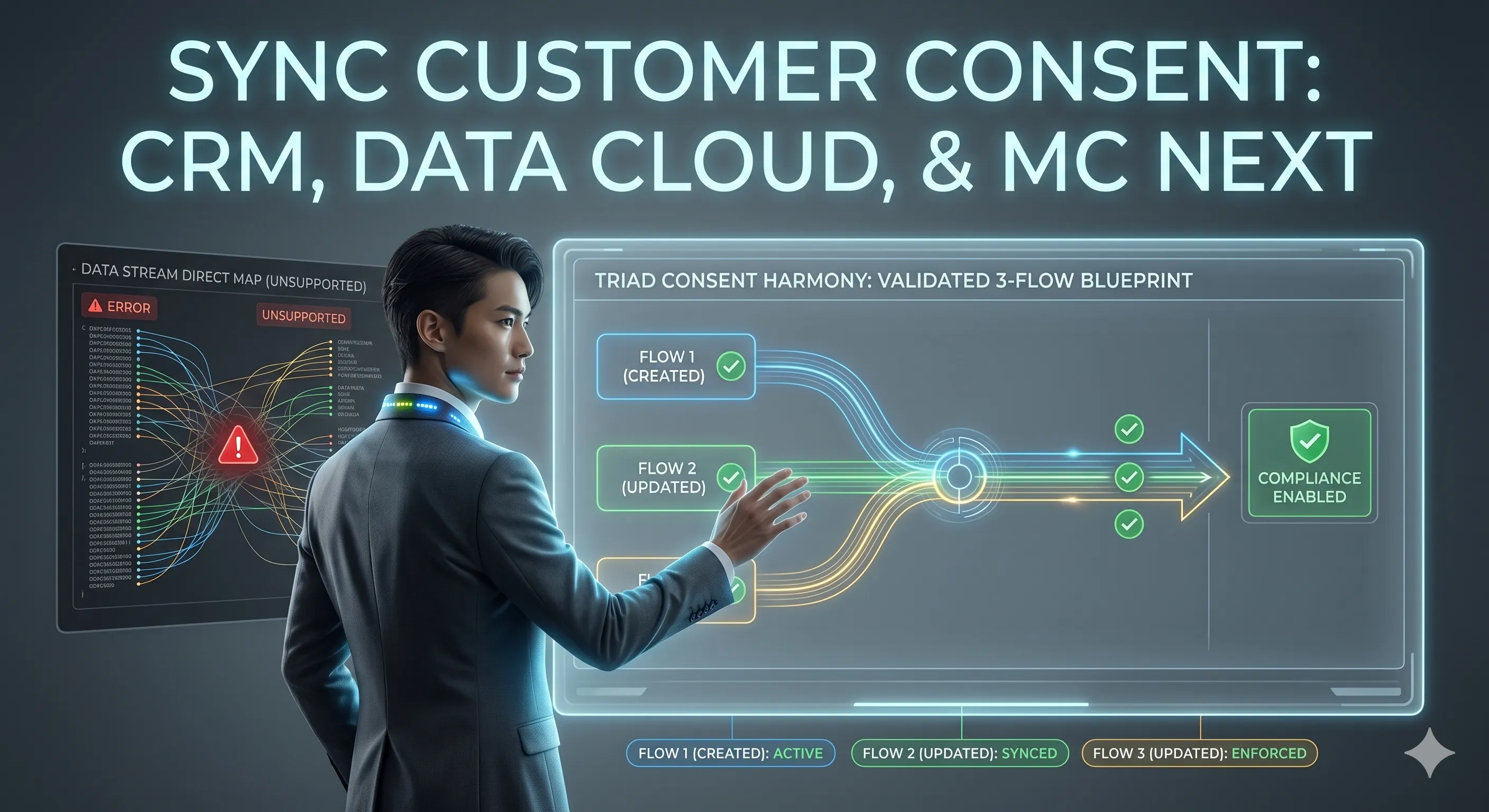
Blueprint for a validated, 3-flow system to achieve customer consent synchronization across Marketing Cloud Next, Data 360, and Salesforce CRM
With the rollout of Marketing Cloud Next, Salesforce has fundamentally reimagined consent management. Consent is no longer an arbitrary text field or a checkbox on a Lead or Contact record. Instead, it is highly structured, multi-channel, and tightly bound to specific Contact Points (such as a unique email address or phone number) rather than the individual record itself.
Excellent conceptual overviews of this paradigm shift have already been highlighted by industry peers, notably François Perret in his Consent Management Deep Dive and Nobuyuki Watanabe in his Guide to Consent Management.
For e-commerce architectures where Salesforce CRM acts as the core transactional repository using the standard Communication Subscription Consent (CommSubscriptionConsent) object, maintaining a real-time, bi-directional sync with Data 360 and Marketing Cloud Next is critical.
Crucially, traditional data integration methods will break your compliance. This post details the strict rules of MC Next consent mechanics and outlines the 3-flow architecture required to keep your systems flawlessly in sync.
The Golden Rule of MC Next Consent: Watch out for Unsupported Methods
Before configuring any synchronization, enterprise architects must understand a major architectural guardrail: You cannot map external consent data directly into the Communication Subscription Consent DMO via data streams or batch data transforms.
While the data may appear to save successfully in the DMO, MC Next will ignore it during message sends. This leads to critical compliance failures:
- Silent Dropouts: Emails may fail to send to fully opted-in addresses.
- Compliance Violations: Emails may be inadvertently sent to opted-out individuals because the transactional consent service did not register the change.
- UI Misalignment: The DMO data will mismatch the Consent Status component on individual records.
For the strict engineering definitions governing these behaviors, consult the official Salesforce documentation on Understanding Consent Concepts in Marketing Cloud Next alongside the master checklist of Marketing Cloud Next Supported Consent Actions.
The Solution: Consent updates within MC Next must be executed via the native Create Consent flow action so that the transactional consent service registers the change. In the current release, Salesforce also supports this action in record-triggered flows, allowing changes to CRM records to update MC Next consent directly. See Update Consent Data with the Create Consent Flow Action for the release details.
The 3-Flow Architecture for E-Commerce Consent Sync
To bridge Salesforce CRM, Data 360, and Marketing Cloud Next without breaking transactional logic, we deploy three specific flows.
Flow 1: New Registration Automation (Record-Triggered)
Trigger Scenario: A new Person Account is created in Salesforce CRM. After the transaction commits, we need to inspect its channel-specific CRM consent records and establish the baseline MC Next consent state for its email and mobile contact points.
graph TD
    A[Trigger: Person Account
    Created] --> B[Async After Commit]
    B --> C[Get CRM Communication
    Subscription Channel Types]
    C --> D[Loop Through
    Channel Types]
    D --> E{Identify Current
    Channel Type}
    E -- Email --> F[Get Latest CRM Consent
    for Account and Channel]
    E -- Mobile SMS --> G[Get Latest CRM Consent
    for Account and Channel]
    F --> H{Check CRM Email
    Consent Status}
    H -- Opt In --> I["Create Consent Action
    Status: Opt In"]
    H -- Opt Out --> J["Create Consent Action
    Status: Opt Out"]
    G --> K{Check CRM SMS
    Consent Status}
    K -- Opt In --> L["Create Consent Action
    Status: Opt In"]
    K -- Opt Out --> M["Create Consent Action
    Status: Opt Out"]
    I --> D
    J --> D
    L --> D
M --> D- Flow Type: Record-Triggered Flow with an asynchronous path
- Trigger Object: Account (
Account) - Trigger Condition: A record is created and
IsPersonAccountequalsTrue - Logic Steps:
- Get Records (
Get CRM Communication Subscription Channel Types): Query all core CRMCommSubscriptionChannelTyperecords after the Account transaction commits. - Loop and Decision (
Identify the Current Channel Type): Iterate through the channel types and route records namedEmailorMobile SMSto their channel-specific path. - Get Records (
Get CRM Consent State): Query the latest core CRMCommSubscriptionConsentwhereConsent Giver IDequals the new Person Account ID andCommunication Subscription Channel Type IDequals the current channel type. - Decision (
Check CRM Consent State): Evaluate the retrievedPrivacy Consent Statusvalue.
- Branch A (Opt In): CRM consent status indicates active subscription acceptance.
- Branch B (Opt Out): CRM consent status indicates explicit non-consent.
- Action Branches:
- Path A (Opt In): Execute the Create Consent action with Consent Status set to
OptIn, the appropriate email or SMS subscription and channel configuration, and the Person Account’s corresponding email address or mobile number as the contact point value. - Path B (Opt Out): Execute the Create Consent action with Consent Status set to
OptOutand the same channel-specific contact point and configuration.
Flow 2: Reflect MC Next Preferences in CRM (Data Cloud-Triggered)
Trigger Scenario: A subscriber updates their preferences via an MC Next default preference page or clicks an unsubscribe URL in an email marketing campaign. This alters the consent state within MC Next, and we must push this downstream to the CRM.
graph TD
    A[Trigger: Communication
    Subscription
    Consent Status Changed] --> B[Get D360 Communication
    Subscription Channel Types]
    B --> C[Match Triggering
    Channel Type]
    C --> D{Identify Email
    or SMS}
    D -- Marketing Email --> E[Get Latest CRM Consent by
    Email Channel and Contact Point]
    D -- Marketing SMS --> F[Get Latest CRM Consent by
    SMS Channel and Contact Point]
    E --> G{Compare D360 and
    CRM Consent States}
    F --> G
    G -- Different --> H[Update CRM Status,
    Source and Effective Dates]
G -- Same --> I[No Update]- Flow Type: Data Cloud-Triggered Flow
- Trigger Object: Communication Subscription Consent (
ssot_CommunicationSubscriptionConsent__dlm) - Trigger Condition: A record is updated and
ssot__ConsentStatus__cchanges - Logic Steps:
- Get and Filter Channel Types: Query the Data 360
ssot__CommunicationSubscriptionChannelType__dlmrecords, select the record whosessot__Id__cmatches the triggering consent’s channel type ID, and inspect its name. - Decision (
Update CRM Consent for the Correct Channel Type): Route names beginning withMarketing EmailorMarketing SMSto the corresponding CRM channel path. - Get Records (
Get CRM Channel Type): Query the coreCommSubscriptionChannelTypenamedEmailorMobile SMS. - Get Records (
Get CRM Consent State): Query the latest coreCommSubscriptionConsentmatching both the CRM channel type and the triggering DMO’s contact point value. - Decision (
Update CRM Consent State): Compare the Data 360 status valuesOPT_INandOPT_OUTwith the CRM valuesOptInandOptOut. Continue only when the two systems disagree. - Update Records Branches:
- If Data 360 is
OPT_IN: Set the matching CRM record’sPrivacyConsentStatustoOptIn. - If Data 360 is
OPT_OUT: Set the matching CRM record’sPrivacyConsentStatustoOptOut. - For either update: Copy the captured timestamp into
ConsentCapturedDateTimeandEffectiveFromDate, setConsentCapturedSourcetoMarketing Cloud Next, and setEffectiveToDateto 12 months after the captured timestamp.
Flow 3: Reflect CRM Updates in MC Next (Record-Triggered)
Trigger Scenario: A customer service agent or an external API modifies a core CRM CommSubscriptionConsent record. This back-office shift must be forced upstream into the MC Next transactional framework.
graph TD
    A[Trigger: CommSubConsent
    Status Changed] --> B[Async After Commit]
    B --> C[Get and Match CRM
    Channel Type]
    C --> D{Identify Email
    or SMS}
    D -- Email --> E[Get D360 Email
    Channel Type]
    D -- Mobile SMS --> F[Get D360 SMS
    Channel Type]
    E --> G[Get Latest D360 Consent by
    Channel and Contact Point]
    F --> H[Get Latest D360 Consent by
    Channel and Contact Point]
    G --> I{Compare CRM and
    D360 Consent States}
    I -- CRM Opt In and D360 Opt Out --> J["Create Consent Action
    Status: Opt In"]
    I -- CRM Opt Out and D360 Opt In --> K["Create Consent Action
    Status: Opt Out"]
    J --> L[MC Next Email
    Consent Updated]
    K --> L
    H --> M{Compare CRM and
    D360 Consent States}
    M -- CRM Opt In and D360 Opt Out --> N["Create Consent Action
    Status: Opt In"]
    M -- CRM Opt Out and D360 Opt In --> O["Create Consent Action
    Status: Opt Out"]
    N --> P[MC Next SMS
    Consent Updated]
O --> P- Flow Type: Record-Triggered Flow with an asynchronous path
- Trigger Object: Communication Subscription Consent (
CommSubscriptionConsent) - Trigger Condition: A record is updated and
PrivacyConsentStatuschanges - Logic Steps:
- Get and Filter Channel Types: Query all core CRM
CommSubscriptionChannelTyperecords, select the record whose ID matches the triggering consent’sCommSubscriptionChannelTypeId, and inspect its name. - Decision (
Update D360 Consent for the Correct Channel Type): RouteEmailandMobile SMSto their channel-specific paths. - Get Records (
Get D360 Channel Type): For email, query the Data 360 channel type whose name begins withMarketing Email. For SMS, use the equivalentMarketing SMSlookup. - Get Records (
Get D360 Consent State): Query the latestssot__CommunicationSubscriptionConsent__dlmrecord matching the selected Data 360 channel type and the triggering CRM record’sContactPointValue__c. - Decision (
Update D360 Consent State): Compare CRMOptInorOptOutwith Data 360OPT_INorOPT_OUT. Invoke an action only when the states disagree. - Action Branches:
- Path A (Consent Given): For either email or SMS, execute the channel-specific Create Consent action with Consent Status set to
OptInand the triggering CRM record’sContactPointValue__c. - Path B (Consent Revoked): For either email or SMS, execute the channel-specific Create Consent action with Consent Status set to
OptOut. This tells the underlying transactional engine to suppress the contact point immediately.
Technical Summary Matrix
| Flow Purpose | Flow Type | Starting Trigger Object | Core Action Element |
|---|---|---|---|
| 1. New Registration Baseline | Record-Triggered, Async | Account (Person Account Created) | Native Create Consent (Action) |
| 2. MC Next —> CRM | Data Cloud-Triggered | ssot__CommunicationSubscriptionConsent__dlm (Status Updated) | Standard Update Records (CRM Core) |
| 3. CRM —> MC Next | Record-Triggered, Async | CommSubscriptionConsent (Status Updated) | Native Create Consent (Action) |
Architect’s Takeaway
When implementing Marketing Cloud Next alongside Data 360, treat consent data with the same strict governance as platform event streams. Do not rely on loose field mapping across data streams. By enforcing this 3-flow structural design pattern, you guarantee that your e-commerce platform remains completely aligned with global privacy frameworks (GDPR/CCPA), ensuring no message is lost—and more importantly, no opt-out is ignored.
Further reading
Recommended on similar topics
If this article was useful, these posts cover adjacent patterns, implementation details, and related architecture decisions.
How to Debug Salesforce Automation Event-Triggered Flows
A practical guide to debugging Salesforce Automation Event-Triggered Flows when $Record is null, including the subflow pattern and live end-to-end validation with Automated Process debug logs.
Read About How to Debug Salesforce Automation Event-Triggered Flows
Migrating Consent from Salesforce CRM to Marketing Cloud Next: The Cache Trap
A practical migration pattern for moving existing Salesforce CRM consent into Data 360 and Marketing Cloud Next without creating a mismatch between the visible consent DMO and the state used at send time
Read About Migrating Consent from Salesforce CRM to Marketing Cloud Next: The Cache Trap